Version 10.2 General Improvements
Major new features in GainSeeker version 10.2
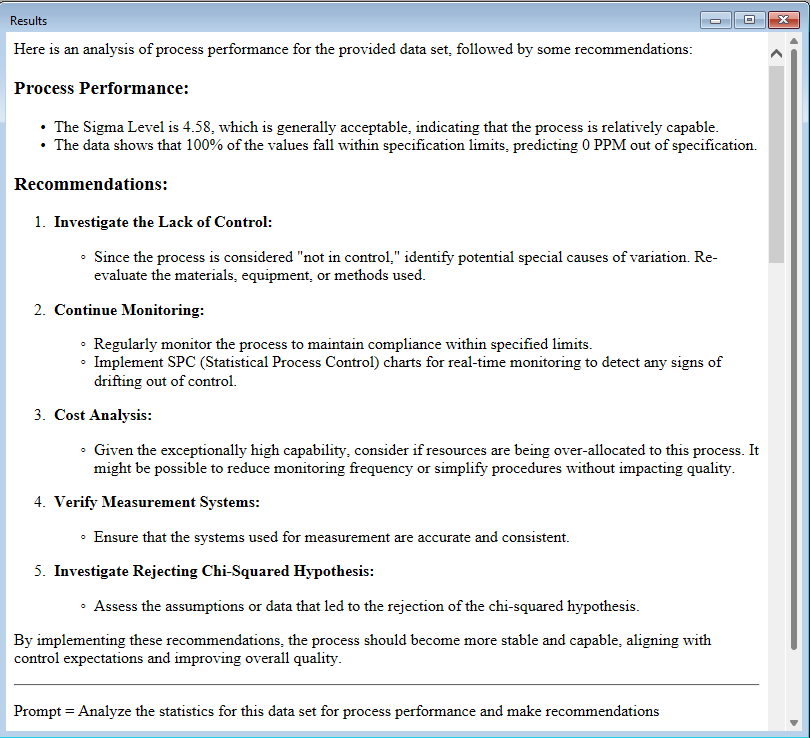
GainSeeker statistics and notes can be sent to Artificial Intelligence websites for additional analysis
A new AI Analyst (Artificial Intelligence Analyst) dashboard control has been added to analyze SPC and DMS statistics. A Send To Artificial Intelligence (AI) option has been added to SPC and DMS individual charts. There is also an option in the Note Manager of the GainSeeker Utility to send Notes to AI. These features allow you to send statistics or notes to AI engines for further analysis. Using any of these features requires an account and an API key from an AI provider. Artificial Intelligence links are set up in the System-wide settings section of the Administration module. (Issues: GAIN-4802, GAIN-4843)

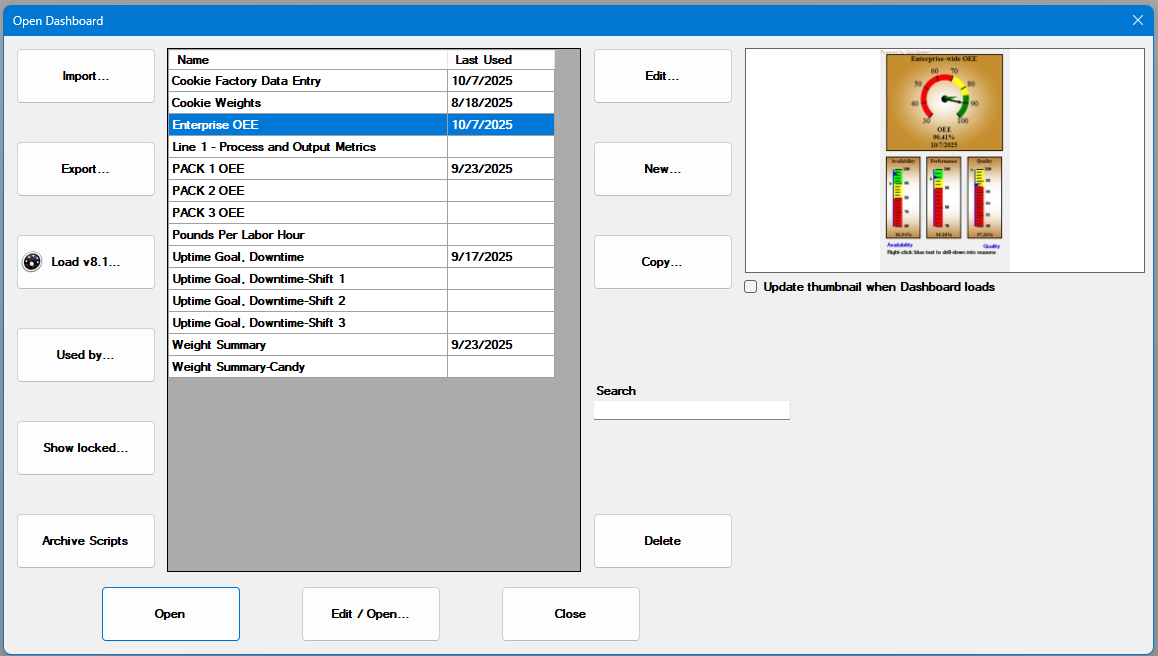
Open Dashboard dialog has been redesigned for better usability
The Open Dashboard dialog has been redesigned for better usability. The dialog has larger buttons and shows more dashboards in the list. It also shows a thumbnail of the selected dashboard. (Issues: GAIN-4720 and GAIN-4801)
Other new features in GainSeeker version 10.2
Multiple modules
-
-
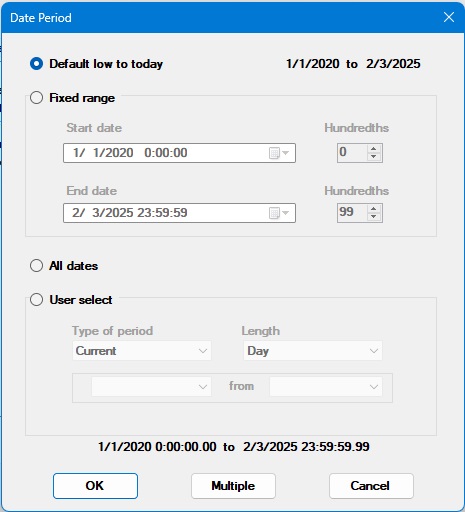
The Date Period dialog has been updated to allow a fixed range to be selected. Previously, you had to click through to an additional dialog to set a fixed range. (Issue: GAIN-4684)
-
-
-
GainSeeker now has the option of allowing or not allowing the OEE Availability, OEE Performance, and OEE Quality metrics to be greater than 100%. Although a value greater than 100% should not be possible, there may be rare circumstances where you want this to be an option. (Issue: GAIN-4745)
-
GainSeeker has more complete language support for French and Spanish in PC Collect and GainSeeker Charts. Language support was added for LaunchPad. Inspections now allow for French and Spanish labels for Sub-inspection names (Labels) and the Cancel button. (Issue: GAIN-4822, GAIN-4832)
-
GainSeeker Inspections
-
-
When creating a Device Profile that uses Advanced Mode, you can now choose to not execute the auto-generated code that opens and closes serial ports. (Issue: GAIN-4756)
-
The Image Test documentation was updated to clarify that all images are displayed in the right side panel when using for the PC. (Issue: GAIN-4778)
-
The PictureMode property was updated to allow for a JPG format (for PC) and the documentation was updated to better reflect the different settings. (Issue: GAIN-4758)
-
A search function has been added to the list of GainSeeker Users when assigning those users to Inspections and Planned Inspections. This allows easier assignment when there is a very long list of users to choose from. (Issue: GAIN-4762)
-
The inspection tests of Checkbox, Pass/Fail, Rating, and Defect List now have the option to override the Inspection DMS Part Number and specify a different Part Number for that instance of the test. This new OverridePartNumber is available in both the property grid at Inspection design and through a python script at run-time. (Issue: GAIN-4785)
-
The Pass/Fail/NA test now has LabelFrench and LabelSpanish properties. When these values are set, they will be used as the test label for the corresponding language being used. (Issue: GAIN-4818)
-
The VerticalSize property of the Traceability test has a new option MultiLine. Set to MultiLine to enter multiple lines of text by auto-wrapping or using Ctrl+Enter for a new line. If set to Multiline and either EntryRestricted = True or a list exists, this property acts like the Regular setting. (Issue: GAIN-4788)
-
Python
-
-
The GainSeeker SQL Python command now supports DataSets. A DataSet is a List of DataTables. This new command allows the execution of multiple SELECT statements at one time, typically through a Stored Procedure. (Issue: GAIN-4744)
-
The inspect.sidepanel.addfile and inspect.sidepanel.addwebpage commands were updated to allow for changing labels and sources for existing tabs. (Issue: GAIN-4676)
-
When saving a Python script, we now check to see if changes were saved by someone else while the script was being updated. If so, we give the user options on how not to lose changes between their current script and the saved script. (Issue: GAIN-4786)
-
For the serial port commands, a new kbmode command gets and sets if the port is in keyboard mode.(Issue: GAIN-4803)
-
Python commands were added to get and set the new LabelFrench and LabelSpanish test properties on the Pass/Fail/NA test. (Issue: GAIN-4818)
-
A new python command, inspect.showrtfwarnings, allows the user to get or set if real-time failures are displayed. (Issue: GAIN-4814)
-
A new python command, inspect.cursubi.ni(idx).nostdsretrieval, determines if the Standard for a Numeric Input will be re-read from the database when a sub-inspection is submitted. (Issue: GAIN-4826)
-
New python commands, retrspc.updatefilter and retrdms.updatefilter, add or update filters. If the filter exists it will be updated, otherwise it will be created. (Issue: GAIN-4831)
-
GainSeeker Charts
-
A new AI Analyst (Artificial Intelligence Analyst) dashboard control has been added to analyze SPC and DMS statistics. This feature allows you to send statistics to AI engines for further analysis. Using this feature requires an account and an API key from an AI provider. Artificial Intelligence links are set up in the System-wide settings section of the Administration module. (Issue: GAIN-4843)
-
A new Send To Artificial Intelligence (AI) option has been added to SPC and DMS individual charts from the right-click Send To menu. This feature allows you to send statistics to AI engines for further analysis. Using this feature requires an account and an API key from an AI provider. Artificial Intelligence links are set up in the System-wide settings section of the Administration module. (Issue: GAIN-4802)
-
The HTML dashboard control now allows the user to browse for a file to display. (Issue: GAIN-4725)
-
The DateTime dashboard control now allows for setting the "No data" interval. This interval is the number of hours that need to elapse after the last data collection is overdue until the status becomes "No data". (Issue: GAIN-4777)
-
When brushing chart data to exclude one or more data points by permanently bypassing them, you can now optionally enter a note that will be added to all selected data points. (Issue: GAIN-4764 )
-
The Dashboard designer now has a menu option to set the size of the dashboard canvas to the maximum size based on the available display area of GainSeeker Charts. (Issue: GAIN-4776 )
-
DPU charts now have the ability to manually scale the y-axis low and/or high values. (Issue: GAIN-4517)
-
When saving desktops, if the user rearranged the chart tabs GainSeeker now remembers their new order when opening the desktop. (Issue: GAIN-4752)
-
Updated the instructions for manually changing the scaling on GainSeeker charts. (Issue: GAIN-4153)
-
Dynamic Desktops now allows SPC Short Run (Process) as a type of data. (Issue: GAIN-4597)
-
The Sigma stripes based on setting has a new option. The option is Spec (Control if Spec not set). (Issue: GAIN-4580)
- The Anchor and Dock properties were added to the Image, Static Text, Dynamic Text, Button, and DateTime Dashboard controls. (Issue: GAIN-4724)
-
A new command line parameter, DASHBOARDEXCEL, allows writing the values of a Dashboard Grid to an Excel file. (Issue: GAIN-4833)
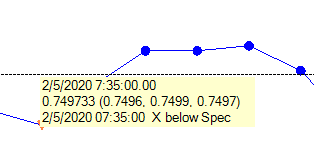
- When you click on a data point on a Control chart, we now display the individual subgroup values with the subgroup average. (Issue: GAIN-4642)
GainSeeker Utility
-
-
The Audit Trail feature now allows for selected rows to be sent to Excel. (Issue: GAIN-4772)
-
A new option has been added to SPC and DMS Note Manager to send Notes to AI (Artificial Intelligence). This feature allows you to send notes to AI engines for further analysis. Using this feature requires an account and an API key from an AI provider. Artificial Intelligence links are set up in the System-wide settings section of the Administration module. (Issue: GAIN-4802)
-
Data can automatically be exported (and optionally deleted) using command line parameters. (Issue: GAIN-4841)
-
Control files can automatically be exported using command line parameters. (Issue: GAIN-4841)
-
At startup, a filter is set so only the last month of data is displayed on the Audit trail. (Issue: GAIN-4852)
-
System Administration
-
-
A new function allows the GainSeeker Administrator to check the list of GainSeeker users for associated Active Directory Users/Groups that do not exist. The users identified are selected in the list of users for easy deletion. (Issue: GAIN-4805)
-
At startup, a filter is set so only the last month of data is displayed on the Audit trail. (Issue: GAIN-4852)
-
Installation
-
-
The installation Utility (GSSetup.exe) uses a new algorithm to find the settings.hsi file when GainSeeker is installed on a new computer. This new algorithm allows for a better installation experience. (Issue: GAIN-4830)
-