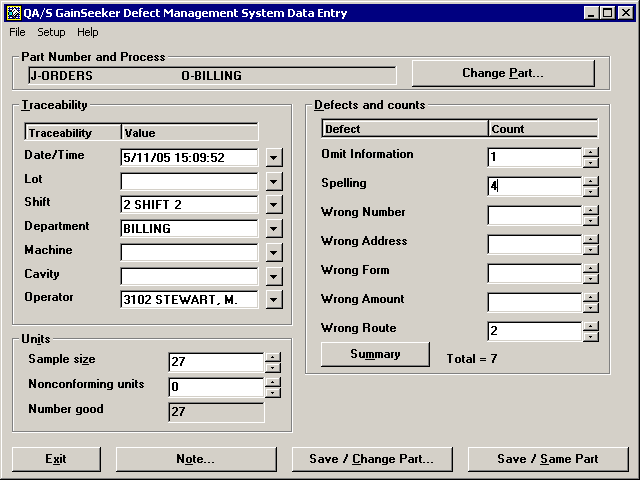
Entering defects
The GainSeeker Administrator configures defects when they set up the Process used by the standard you selected. For more information, see Process Information.
If you are entering data for a sample with no defects, then you can proceed to Entering the number of Nonconforming units.
There are two basic ways to enter defects:
Alternately, you can click in the Count box for the defect and then press the PLUS SIGN (+) key to increase the count.
Click here for an example:Click here for an example:
Each day you review a stack of orders that have been billed by another employee. The number of orders can differ from one day to the next.
After entering yesterday's date and the traceability values for this batch of orders billed, you review the first order in the stack and find 1 spelling mistake and 1 routing mistake.
-
Click the Sample size  button to increase the sample size from 0 to 1.
-
Click the Spelling button to increment the count of spelling defects by 1.
-
Click the Wrong Route button to increment the count of routing defects by 1.
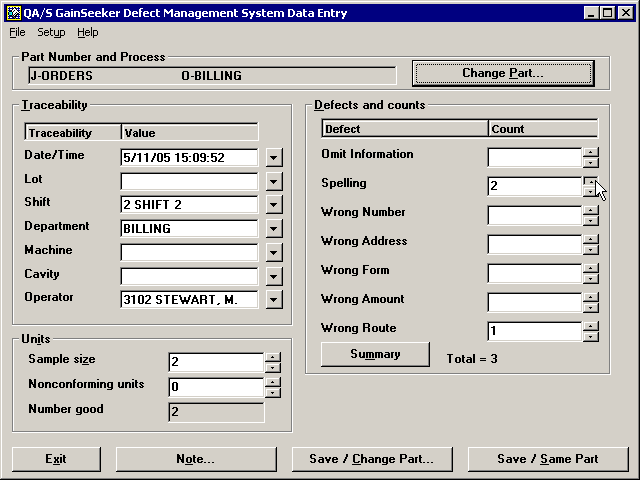
You then review the second order, which had 1 spelling mistake.
-
Click the Sample size button to increase the sample size from 1 to 2.
-
Click the Spelling button to increment the count of spelling defects from 1 to 2.
You continue to repeat this process until you have reviewed all the orders in the stack.
More:
Entering the number of Nonconforming units
Using the basic functions of DMS Data Entry