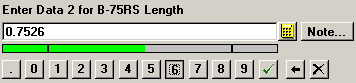
The number buttons allow you to click on buttons instead of typing on the keyboard. This is especially useful when entering data in PDA mode.
To remove the previous character, click the Back space button  . Alternately, you may highlight one or more characters to be deleted, and then click a button to replace the highlighted characters with a new character.
To remove the following character, click the Delete button  .
.
To enter the displayed value, click the  button.
|
|
