Email send method, server, TCP port, and TLS/SSL settings
You can configure GainSeeker to send email via your email server. These settings are found in the System-wide settings branch on the Configurations tab of the GainSeeker System Administration module.
GainSeeker functions that depend on these settings include:
Automatically sending an email alert each time a user is prevented from logging in to a program module because all licenses were in use
Sending charts and messages using Microsoft Outlook or GainSeeker's built-in email feature
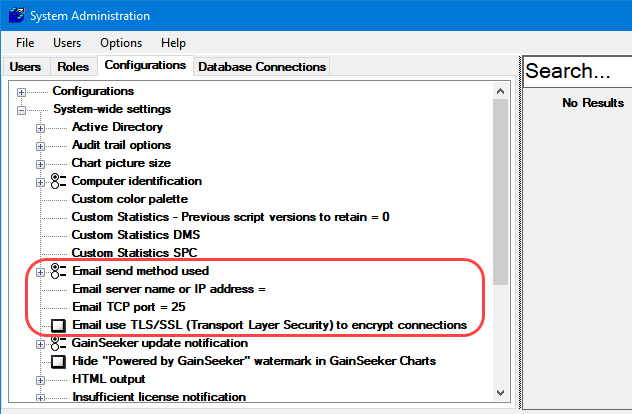
Email send method used
This setting determines how GainSeeker sends email from modules such as GainSeeker Charts, PC Collect, GS Console, and Dynamic Reports - including GainSeeker Python scripts that use the Python Email command. (For email in legacy modules, see Configuring e-mail settings for GainSeeker.)
Options include:
Use built-in, SMTP
GainSeeker will launch and/or send the new email using the built-in SMTP email function.
This requires the Email server name or IP address (below) to be configured correctly.
If using Microsoft Office 365 with this built-in SMTP email function, this requires the Email TCP port and Email use SSL (below) to be configured correctly, your email administrator must enable SMTP AUTH for the mailboxes that will send email through SMTP, and you must configure the Email login name and Email login password for each GainSeeker user.
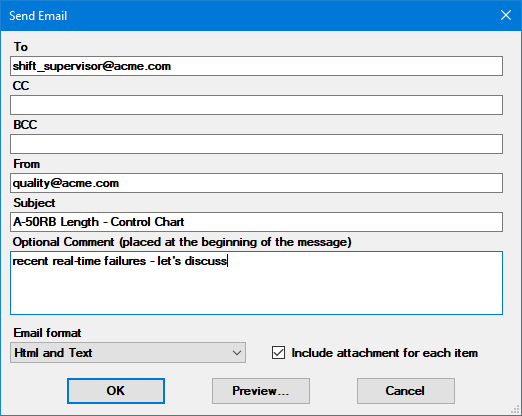
Use Outlook (if available), HTML format
If Microsoft Outlook is available on a GainSeeker workstation, GainSeeker will launch and/or send the new email in Outlook with the email body formatted as HTML. The new email message may include the recipient, Subject line, body, and attachments. Any comma-separated list of email recipients in GainSeeker will be sent to Outlook as a semicolon-separated list.
If Microsoft Outlook is not available on a GainSeeker workstation, GainSeeker will launch and/or send the new email using the built-in SMTP function.Use Outlook (if available), text format
If Microsoft Outlook is available on a GainSeeker workstation, GainSeeker will launch and/or send the new email in Outlook with the email body formatted as text. The new email message may include the recipient, Subject line, body, and attachments. Any comma-separated list of email recipients in GainSeeker will be sent to Outlook as a semicolon-separated list.
If Microsoft Outlook is not available on a GainSeeker workstation, GainSeeker will launch and/or send the new email using the built-in SMTP function.
Email server name or IP address
Configure this setting for the name or IP address of your email server.
This setting must be configured correctly if GainSeeker will send any emails using the built-in SMTP email function (above).
For Microsoft Office 365 using the built-in SMTP email function, use smtp.office365.com .
For a corporate email system such as Microsoft Exchange using the built-in SMTP email function, your IT department can provide this information.
For Gmail, use smtp.gmail.com . You must also use a web browser to log in to Gmail and edit your account settings to enable the setting Allow less secure apps. GainSeeker cannot send email via Gmail from the SPC Data Entry module or from legacy GainSeeker modules such as SPC Charts and Reports, DMS Charts and Reports, and Enterprise Dashboard.
For Yahoo mail, use smtp.mail.yahoo.com . GainSeeker cannot send email via Yahoo from the SPC Data Entry module or from legacy GainSeeker modules such as SPC Charts and Reports, DMS Charts and Reports, and Enterprise Dashboard.
Email TCP port
This setting specifies the TCP port number that GainSeeker should use to send emails.
This setting must be configured correctly if GainSeeker will send any emails using the built-in SMTP email function (above).
The default TCP port number is 25, which works correctly for most email systems.
For Microsoft Office 365 using the built-in SMTP email function, use 587.
For Gmail, use 587.
Email use TLS/SSL to encrypt connections
This setting must be configured correctly if GainSeeker will send any emails using the built-in SMTP email function (above).
If your email system requires TLS/SSL (Transport Layer Security / Secure Sockets Layer), you should select this checkbox.
Some email systems that require TLS/SSL include:
Microsoft Office 365 using the built-in SMTP email function
Gmail
Yahoo mail